The Best Free Chinese Character Worksheet Generators, Compared (2026)
When I started printing Chinese writing worksheets for my kids, I was surprised by how little context most of them provided. No pinyin. No tone indicators. Just raw characters on a grid. The worksheets looked fine on screen, but they were missing the cues that help a beginner know where to start.
I tried every free tool I could find. Some were great. Some were barely functional. Eventually I couldn't find exactly what I wanted, so I built my own. But before I talk about that, here's what I learned — because if you're a parent or teacher looking for Chinese writing practice sheets, the landscape is confusing and nobody seems to have written an honest comparison.
What Are Grid Types and Why Do They Matter?
If you've looked at Chinese writing worksheets, you've seen the grids. But they're not all the same, and picking the right one actually matters for how well kids learn character proportions.
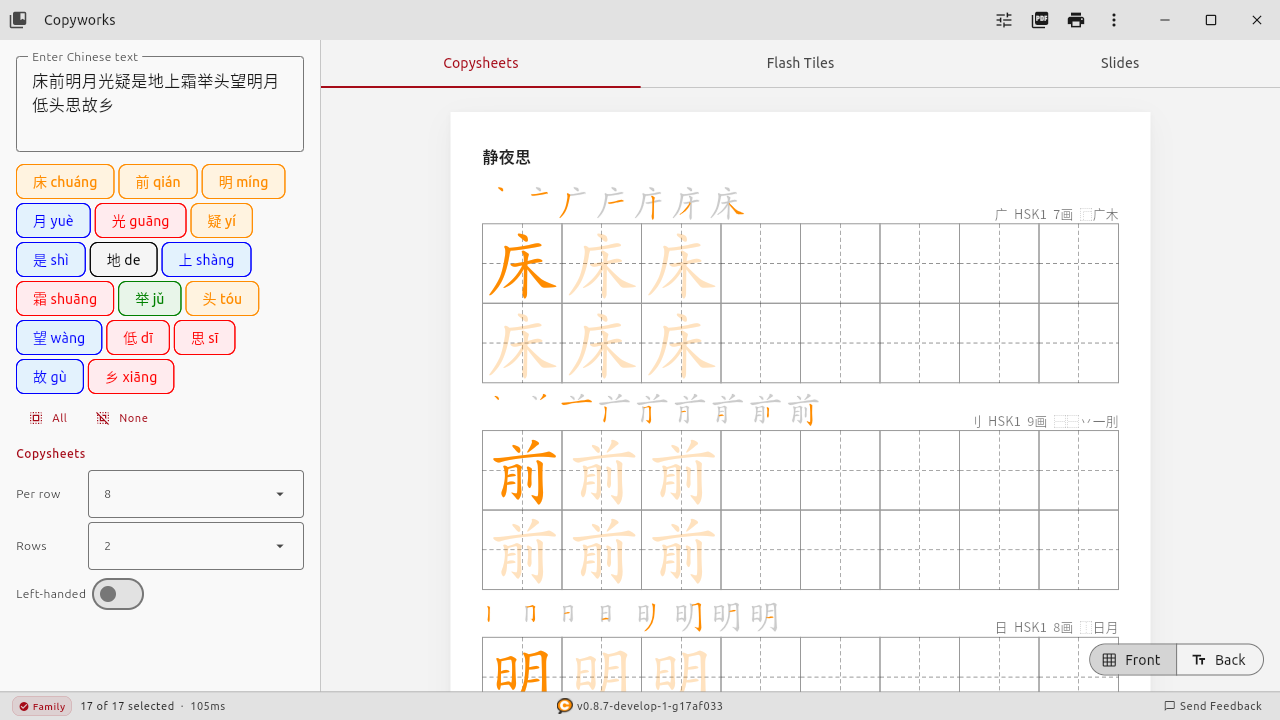
Tian Zi Ge (田字格) — The Standard
The Tian Zi Ge worksheet is what most Chinese schools use. It's a square divided into four quadrants by a dashed cross. The guides help kids position strokes in the right part of the character — top-left, bottom-right, and so on. If you're not sure which grid to use, start here. It's the default for a reason.
Mi Zi Ge (米字格) — More Structure
Mi Zi Ge adds diagonal lines to the Tian Zi Ge pattern, creating eight sections instead of four. This gives kids more reference points for complex characters with diagonal strokes. It's especially helpful for characters like 永 (yǒng) where the proportions are tricky. Some teachers prefer starting with Mi Zi Ge and moving to Tian Zi Ge as kids gain confidence.
Hui Gong Ge (回宫格) — Proportional Precision
Hui Gong Ge uses a smaller inner square within the outer square. The idea is that the core of most characters should fit inside that inner box, with only extending strokes reaching the outer edges. It's less common but genuinely useful for kids who write characters that are either too cramped or too spread out.
A plain grid with no guides (sometimes called "no grid" or blank practice squares) is fine for more advanced students who just need the structure of consistent character sizing.
Tone Colors: The Feature Nobody Else Offers on Printable Worksheets
Here's something that frustrated me about every worksheet generator I tried: none of them used tone colors on the printed output.
If you've used Pleco, Du Chinese, or most modern Chinese learning apps, you've seen tone coloring — each character is colored based on its tone. The standard scheme looks like this:
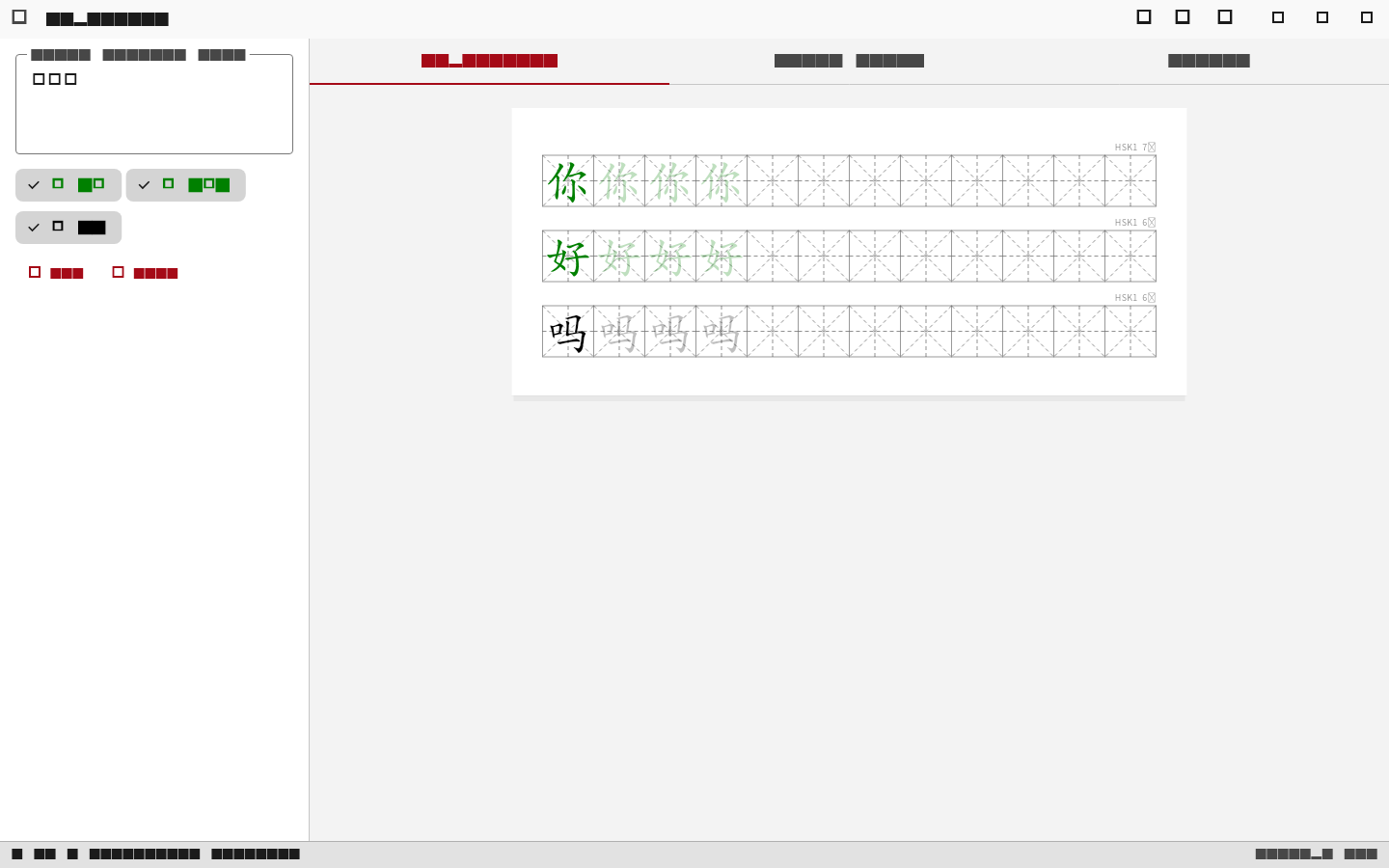
Tone colors work because they create a visual association that reinforces memory. Kids are visual learners, and color is a powerful cue that plain black text throws away.
The research backs this up too. Multi-sensory encoding (combining visual, motor, and phonological information) creates stronger memory traces than any single channel alone. When a kid traces a character in a colored grid while saying the pinyin, they're building three pathways to the same piece of knowledge.
Every app on your phone has tone colors. But print a worksheet from any of the free generators and it's all black. That gap between screen learning and paper practice always bugged me.
Free Chinese Character Worksheet Generators: An Honest Look
I've used most of the tools out there. Here are the ones worth knowing about.
an2.net
an2.net is completely free and has been around for years. You paste in characters, pick a grid style, and it generates a PDF. It's straightforward, web-only, and does what it says. The interface is dated and the options are minimal — no pinyin above characters, no tone colors, no stroke order — but for a quick worksheet with basic Tian Zi Ge grids, it works. I used it for months before wanting more.
Arch Chinese
Arch Chinese is the most feature-rich option and it's what many Chinese teachers swear by. It has stroke order animations, radical breakdowns, and a solid worksheet generator. The catch: the full features cost $100/year. There's a limited free tier, but you'll hit the paywall quickly. If you're a school with a budget, it's worth considering. For a parent printing worksheets at home, that price tag stings.
Other Options
dohliam's generator is a single HTML file you can run locally — open-source and clever, but very bare-bones. Mandarin Minutes has a decent web generator that currently ranks well in search. Purple Culture offers a free web generator with some nice options. All web-only, all lacking tone colors on output.
| Feature | an2.net | Arch Chinese | Copyworks (Free) | Copyworks (Family) |
|---|---|---|---|---|
| Price | Free | $100/yr | Free | $29/yr or $49 lifetime |
| Tone colors on PDF | No | No | Yes | Yes |
| Grid types | Basic | Multiple | All (Tian Zi Ge, Mi Zi Ge, Hui Gong Ge, No Grid) | All (Tian Zi Ge, Mi Zi Ge, Hui Gong Ge, No Grid) |
| Stroke order | No | Yes (web) | Yes | Yes |
| Simplified + Traditional | Yes | Yes | Yes | Yes |
| Content library (HSK, textbooks) | No | Some | No | Yes (HSK 1-9, 33 textbooks, poems, idioms) |
| Works offline | No | No | Yes | Yes |
| Platform | Web | Web | Win / Mac / Linux / iOS / Android | Win / Mac / Linux / iOS / Android |
Why I Built Copyworks
I didn't set out to build a product. I set out to print better worksheets for my kids.
The thing I couldn't find anywhere was a worksheet generator that put tone colors on the actual printed PDF. Every app had them on screen, but the moment you hit print, everything went to black. I wanted the same color cues on paper that worked so well on screen.
So I built Copyworks. It started as a script. Then it became a desktop app. Then other parents started asking for it.
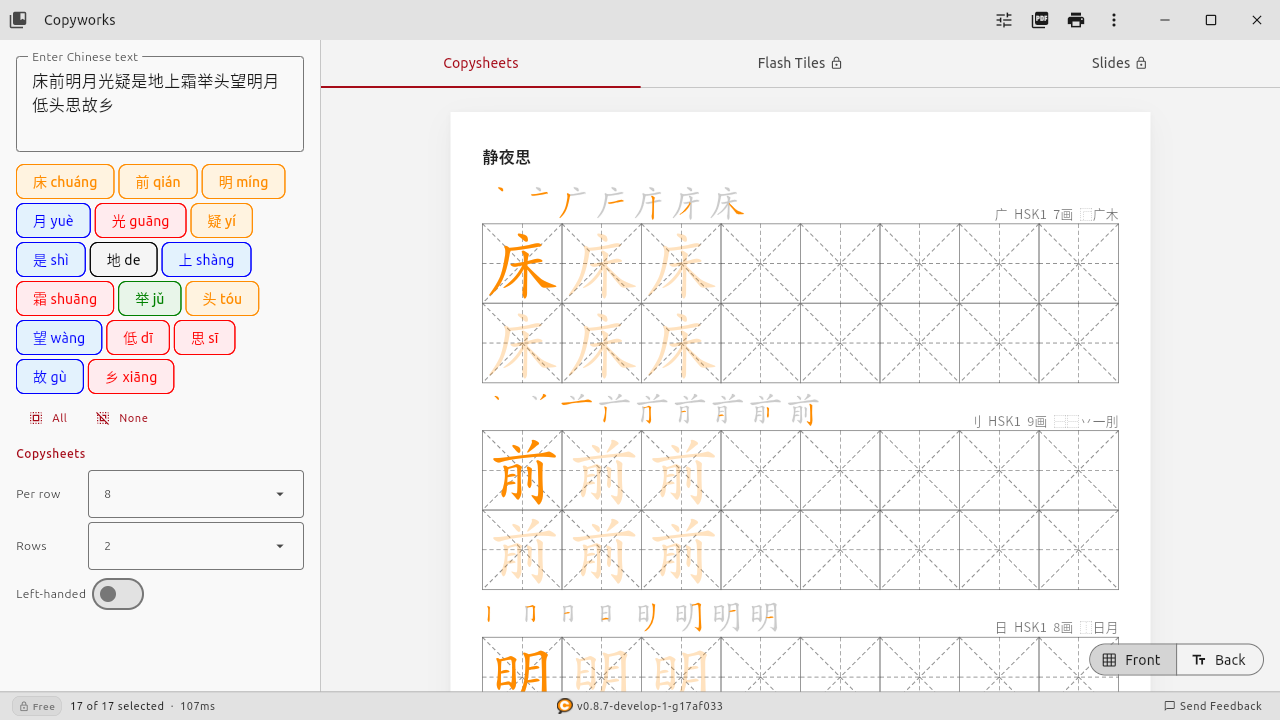
The free tier gives you what I think every parent needs to get started: tone-colored characters, all four grid types (Tian Zi Ge, Mi Zi Ge, Hui Gong Ge, and No Grid), stroke order display, up to 8 characters per worksheet, both simplified and traditional Chinese, and PDF export. It runs on Windows, macOS, Linux, iOS, and Android. It works completely offline — no account, no login, no data collection.
All PDFs include a small QR chop seal in the footer — a crimson ink seal with an embedded QR code. It's our brand signature and appears on all tiers.
The Family Plan ($29/year or $49 lifetime) unlocks the content library with HSK levels 1 through 9, classical poems, idioms, and vocabulary from 33 popular textbooks. Also: flash tiles, slides, additional fonts, left-handed mode, which offsets the guide characters so your lefty kid's hand doesn't cover them while writing.
Left-handed writers cover the model character with their wrist on standard worksheets. Flipping the layout is a small thing that makes a big difference.
Practical Tips for Better Chinese Writing Practice
Regardless of which tool you use, here's what's worked for our family:
- Start with 5-8 characters per session, not 20. Kids burn out fast. Short, focused practice beats long, reluctant sessions every time.
- Use grid guides until they don't need them. Start with Mi Zi Ge or Tian Zi Ge, move to plain grids when proportions feel natural.
- Print in color if you can. A color printer or even a color copier at the library makes tone-colored worksheets actually useful. Black-and-white still works, but you lose the tone cue.
- Mix writing with recognition. Don't just have them trace — also quiz them on reading the characters they've practiced. Writing and reading reinforce each other.
- Match worksheets to what they're learning. If your kid is in a Chinese school or using a textbook, generate worksheets from the same vocabulary. The repetition across contexts is what makes it stick.
Getting Started
If you just need a quick worksheet right now and don't want to install anything, an2.net will get the job done in thirty seconds. No judgment — I used it for months.
If you want tone colors, offline access, and something that grows with your kid from first characters through HSK 9, give Copyworks a try. The free tier is genuinely free — no trial period, no credit card, no "free for 7 days" tricks.
Download Copyworks
Free Chinese character worksheet generator with tone colors. Available on Windows, macOS, and Linux. iOS & Android beta — contact us for early access.
Get Copyworks FreeIf you have questions or feature requests, I read every message. I'm a dad who builds software, not a company with a support ticket queue. Reach out anytime.