Chinese Character Worksheet Generator: A Complete Guide to Practice Sheets That Actually Work
Writing Chinese characters by hand is one of the most effective ways to learn them. Apps can drill recognition and flashcards can build vocabulary, but tracing strokes in the right order, getting proportions right inside a grid -- that is what makes characters stick in long-term memory.
The problem is finding good practice material. If you search for a Chinese character worksheet generator, you will find static PDFs, dated web tools, and expensive subscriptions. Many produce worksheets missing the context a learner needs -- no pronunciation guides, no stroke order, no tone information.
I am a software developer and a dad raising bilingual kids. After years of printing worksheets from various tools and being frustrated by what was missing, I built my own. This is the guide I wish I had found when I started.
What Makes a Chinese Writing Worksheet Effective
A grid full of characters with no context is better than nothing, but it leaves a lot on the table. Here is what actually matters for effective practice.
Proper Grid Guides
Chinese characters need to fit inside a consistent square space with balanced proportions. Grid guides give learners reference points for where strokes should start, end, and intersect. The three most common grid types are:
- Tian Zi Ge (田字格) -- a square divided into four quadrants by a dashed cross. This is the standard grid used in Chinese elementary schools. It helps learners position strokes in the correct quadrant.
- Mi Zi Ge (米字格) -- adds diagonal lines to the Tian Zi Ge cross, creating eight sections. The extra reference lines are helpful for characters with diagonal strokes and for getting the proportions of complex characters right.
- Hui Gong Ge (回宫格) -- uses a smaller inner rectangle within the outer square. The idea is that the core body of a character should sit inside the inner box, with only extending strokes reaching the outer edges.
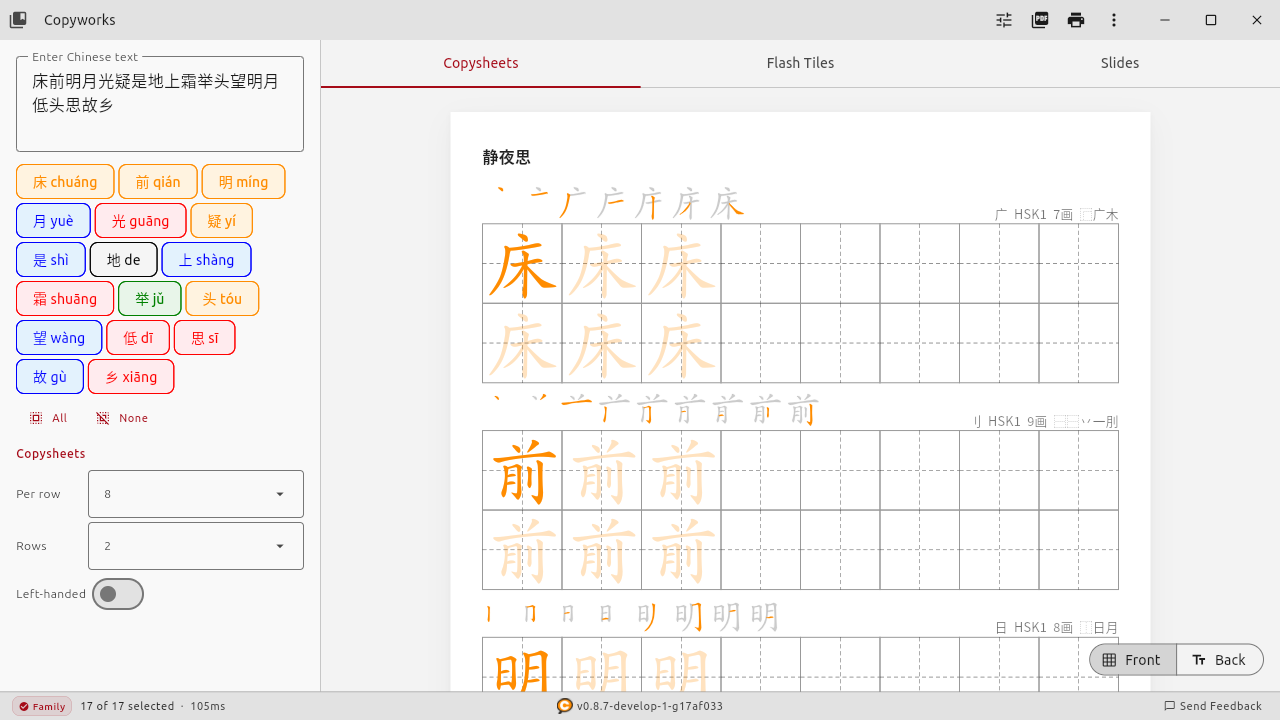
Which grid to use depends on the learner. Mi Zi Ge provides the most structure and is a good starting point for beginners. Tian Zi Ge is the classroom standard and what most textbooks use. Once a learner has internalized character proportions, plain squares with no guides are fine.
Stroke Order Reference
Chinese characters are written in a specific stroke order. This is not arbitrary -- the order follows consistent rules (top to bottom, left to right, outside before inside) that make writing faster and more natural with practice. Learning the wrong stroke order creates habits that are hard to unlearn later.
A good Chinese character practice worksheet should show the stroke order directly on the page, so the learner can reference it while writing. Step-by-step numbered stroke diagrams are ideal. Having to look up each character's stroke order in a separate app or dictionary interrupts the flow of practice.
Pronunciation and Tone Information
Writing practice should reinforce pronunciation, not happen in isolation from it. Including pinyin (mainland romanization) or bopomofo/zhuyin (Taiwan phonetic system) alongside each character ties the written form to its sound.
And this is where most generators fall short: tone information. Mandarin has four tones plus a neutral tone. The same syllable with different tones means completely different things:
Most Chinese learning apps use tone colors -- coloring each character based on its tone. Red for first, orange for second, green for third, blue for fourth. This visual association helps learners internalize tones naturally, especially for kids who respond to color before they can articulate grammar rules.
But print a worksheet from nearly any existing generator and the tone colors disappear. Everything comes out in black. The visual cue that works on screen is lost on paper, where handwriting practice actually happens.
What to Look for in a Chinese Character Worksheet Generator
Here is a practical checklist for evaluating any worksheet generator:
- Grid options -- Tian Zi Ge, Mi Zi Ge, or other guided grids?
- Stroke order -- Shown on the worksheet itself?
- Pinyin/Bopomofo -- Pronunciation included above characters?
- Tone colors on the printed output -- Not just on screen, but on the actual PDF?
- Simplified and Traditional -- Both character sets supported?
- Content library -- Pre-built vocabulary lists (HSK, textbook chapters)?
- Export quality -- Print-quality PDF output?
Free Options for Chinese Character Worksheets
There are several free tools available. Here is an honest look at what each one does well and where it falls short.
Static PDF Collections
Sites like Chalk Academy, Pinterest boards, and Teachers Pay Teachers offer pre-made Chinese character practice sheets as downloadable PDFs. Convenient if the vocabulary matches what you need, but you cannot customize them for a specific character list.
Web-Based Generators
an2.net is one of the longest-running free options. Paste in characters, pick a grid, get a PDF. Simple and fast, but no pinyin annotations, no tone colors, no stroke order on the output.
Mandarin Minutes and Purple Culture offer similar web-based generators. All are web-only and produce black-and-white output.
Paid Platforms
Arch Chinese is the most feature-rich web platform, with stroke order animations, radical breakdowns, and a worksheet generator. Well-regarded by Chinese teachers. Full features require a subscription ($50-90/year). Worth evaluating if you have a budget for it.
Hanzi Grids offers configurable grid layouts for about $10 AUD. Focuses on grid quality but does not include stroke order or annotations.
How Copyworks Approaches the Problem
Full disclosure: I built Copyworks, so take this section with that context. I will stick to what the software actually does today, not aspirational features.
Copyworks is available on Windows, macOS, Linux, iOS, and Android. It generates printable Chinese character worksheets and runs entirely offline -- no account required, no internet connection needed after installation.
The features that drove me to build it, because I could not find them elsewhere:
Tone Colors on Printed Worksheets
This was the original motivation. Copyworks renders characters in tone colors (1st tone = red, 2nd = orange, 3rd = green, 4th = blue, neutral = black) on the actual PDF output. If you have a color printer, the worksheets maintain the same visual tone cues that apps like Pleco and Du Chinese use on screen. If you are printing in black and white, you can toggle tone colors off and use solid black characters instead.
Tone colors are free -- they are not behind a paywall. This is the feature I most wanted to exist in the world, so it did not make sense to gate it.
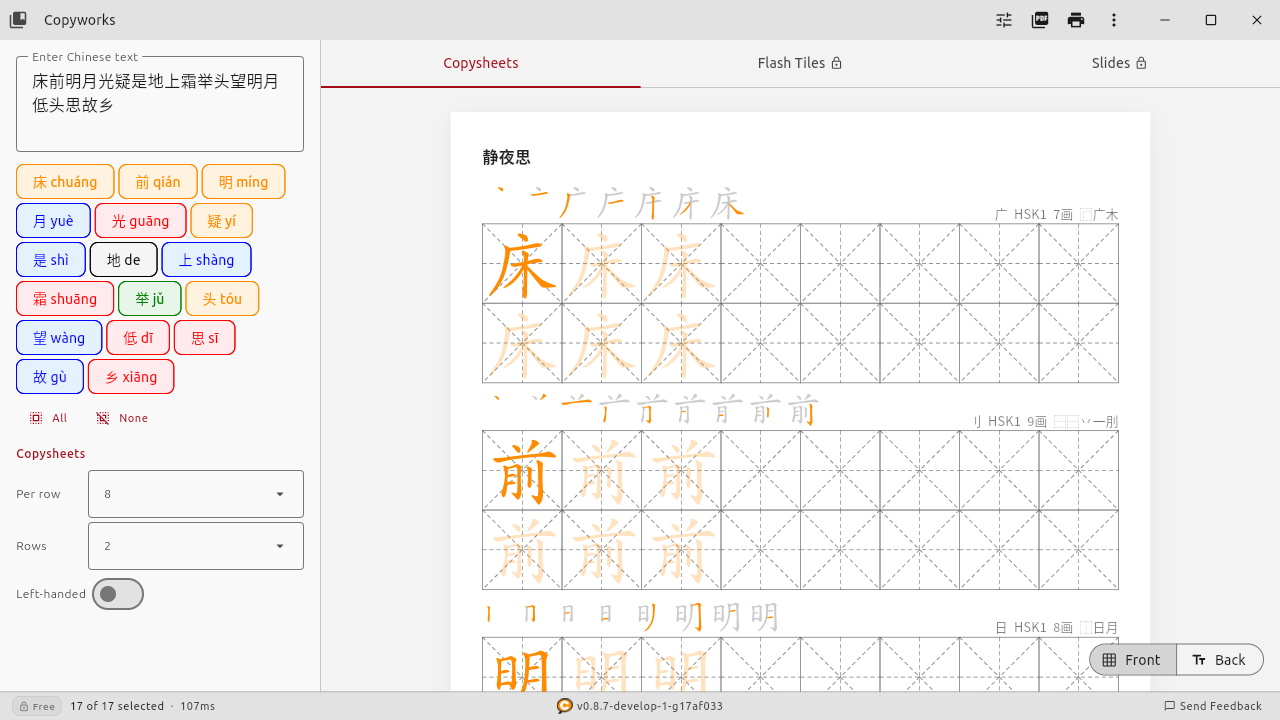
Stroke Order Display
Each character row on a Copyworks worksheet includes a step-by-step stroke order diagram showing numbered, sequentially colored strokes. The learner can see exactly which stroke comes first, second, third, and so on, without leaving the page. This is also free for all users.
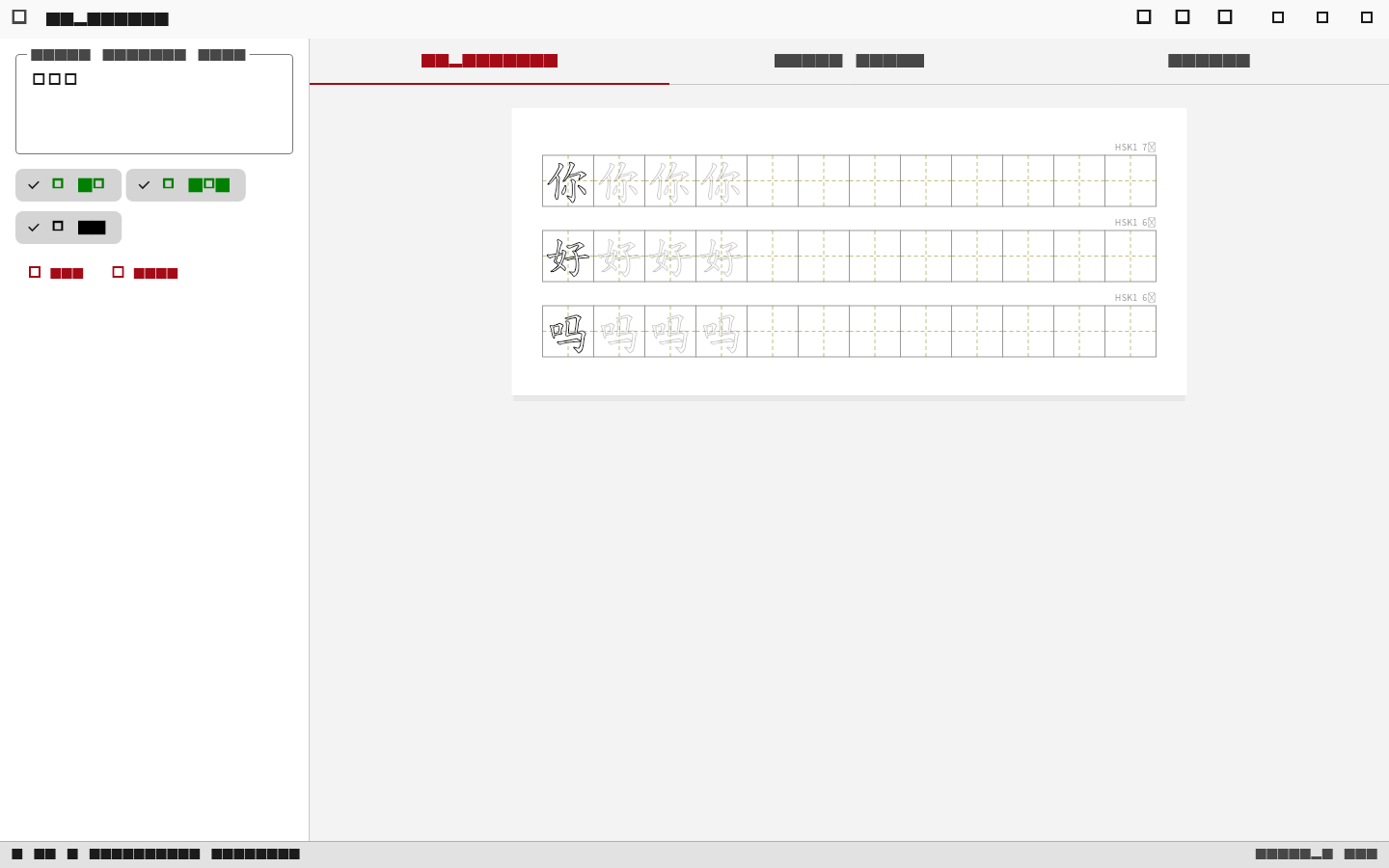
All Grid Types, Free
Copyworks supports all four grid types -- Tian Zi Ge, Mi Zi Ge, Hui Gong Ge, and plain (no grid) -- on the free tier. You can switch between them and see the result instantly in the preview before printing.
Annotations
Every worksheet can include pinyin with diacritical tone marks, bopomofo (zhuyin), English definitions, HSK level badges, stroke count, and radical information. These are all available on the free tier. Definitions are available in 12 languages, not just English -- including German, French, Spanish, Japanese, Korean, Russian, Indonesian, Vietnamese, Filipino, Swedish, and Persian.
Content Library
The free tier includes curated content: HSK Level 1, YCT Level 1, Bible verses, 5 classic poems, surnames, idioms, animals, and Kangxi radicals. The Family plan ($29/year or $49 lifetime) unlocks the full library: HSK 1-9, YCT 1-4, TOCFL Band A, 33 textbook series, Tang poems, and more -- over 1,700 lessons across 117 categories. Generate a worksheet for "HSK 3, Lesson 7" in a few clicks instead of typing each character.
What the Free Tier Includes (and What It Does Not)
I want to be straightforward about this, because vague "free" claims are frustrating when you hit an unexpected paywall.
| Feature | Free | Family ($29/yr or $49 lifetime) |
|---|---|---|
| Tone colors | Yes | Yes |
| Stroke order display | Yes | Yes |
| All 4 grid types | Yes | Yes |
| Pinyin, Bopomofo, definitions | Yes | Yes |
| Simplified + Traditional | Yes | Yes |
| Left-handed mode | Yes | Yes |
| Characters per worksheet | Up to 8 | Unlimited |
| Content library | HSK 1 + Bible | 1,700+ lessons (HSK 1-9, textbooks, poems, more) |
| PDF export | With QR chop seal | With QR chop seal |
| Flash tiles (cut-and-fold flashcards) | Yes | Yes |
| 6 printable games (Bingo, Memory, Coloring, Tic-Tac-Toe, Word Search, Sudoku) | Yes | Yes |
| Slides (full-page character cards) | No | Yes |
| Extra calligraphy fonts | No | Yes |
| Works offline, no account | Yes | Yes |
The free tier is not a trial. There is no expiration and no credit card required. The 8-character limit is the main constraint -- it is enough for one full practice sheet, but real lessons from textbooks or HSK levels often have 10 to 25 characters.
A 7-day free trial of all Family features starts automatically when you install the app, so you can evaluate everything before deciding.
Practical Tips for Chinese Character Writing Practice
Whatever tool you end up using, here are some things that have worked well for our family and that we have heard from teachers who use Copyworks.
Keep Sessions Short
Five to eight characters per session is plenty for younger kids. Ten focused minutes beats 30 reluctant ones.
Progress from Guided to Unguided
Start with Mi Zi Ge or Tian Zi Ge grids. Move to plain squares as the learner internalizes character proportions.
Combine Writing with Reading
After writing, quiz on recognition and pronunciation. A character that a child can write from memory and read on sight is truly learned.
Match Worksheets to Current Curriculum
If your child follows a textbook or attends Chinese school, generate worksheets from the same vocabulary. Repetition across contexts builds durable memory.
Use Color When You Can
If you have access to a color printer -- even a library color copier works -- tone-colored worksheets add a useful layer of information. If you only have a black-and-white printer, the worksheets still work fine without color.
Left-Handed Learners
Standard worksheets put the reference character on the left, which a left-handed writer covers with their wrist. Look for a layout that puts the model on the right side instead. Copyworks has a left-handed mode that handles this automatically.
How Stroke Order Works (and Why It Matters)
Chinese characters follow consistent stroke order rules refined over centuries of brush calligraphy. Writing strokes in the standard order produces balanced, natural-looking characters. More practically, stroke order is standardized in Chinese education -- textbooks, teachers, and exams all assume the standard order. Learning the wrong order creates habits that are hard to correct later.
The basic rules are: top to bottom, left to right, horizontal before vertical when they cross, outside before inside for enclosing strokes, and center before sides for symmetrical characters. Having the stroke order printed directly on the worksheet means the learner does not need to look it up separately, keeping the flow of practice uninterrupted.
Simplified vs. Traditional Characters
Simplified characters are used in mainland China, Singapore, and Malaysia, and are the standard for HSK exams. Traditional characters are used in Taiwan, Hong Kong, and Macau, and are the standard for TOCFL exams and Cantonese-speaking communities. The right choice depends on your family's situation and connections. Some families teach both -- the overlap is significant, and knowing one makes learning the other easier.
Whatever you choose, make sure your worksheet generator supports it. Some tools are simplified-only. Copyworks supports both simplified and traditional, with a toggle to switch between them.
Getting Started
If you need a worksheet right now and do not want to install anything, an2.net will produce a basic grid in thirty seconds. For a more fully-featured web option, Arch Chinese has a free tier worth trying (some features require a paid subscription).
If you want tone colors on the printed page, stroke order diagrams, all grid types, and offline access with no account required, Copyworks is what I built to solve that problem. The free tier is genuinely free -- no trial expiration, no credit card, no data collection.
Download Copyworks Free
Chinese character worksheet generator with tone colors, stroke order, and 4 grid types. Windows, macOS, and Linux. No account required.
Get Copyworks FreeIf you have questions, feedback, or feature requests, I am reachable at tim@loqu8.com. I am a dad who writes software, not a faceless corporation with a ticket queue. I read every message.