WEB SUPPORT AND UPDATES
Firefox and Chrome browsers

Browsers
After installing Loqu8 iCE and entering your license key, enable the add-on and extension for your browsers:
- Google Chrome
- Mozilla Firefox
- Microsoft Edge and Internet Explorer: not required
By enabling this support, you will be able to use the LiveScan and HighlightScan functions
Configure Updates
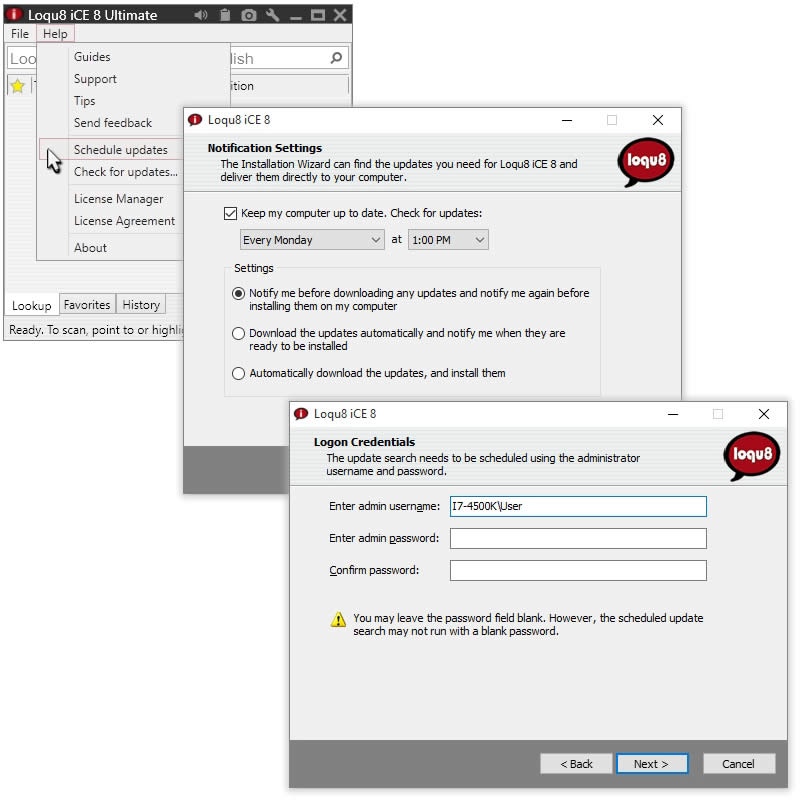
After restarting your PC, Loqu8 will offer to install Updates. You may also install the Updates utility by choosing Help > Schedule Updates:
Congratulations
Loqu8 iCE Learn Chinese software has been installed. To learn more, choose: